ScreenMaster2.9
Publisher Description
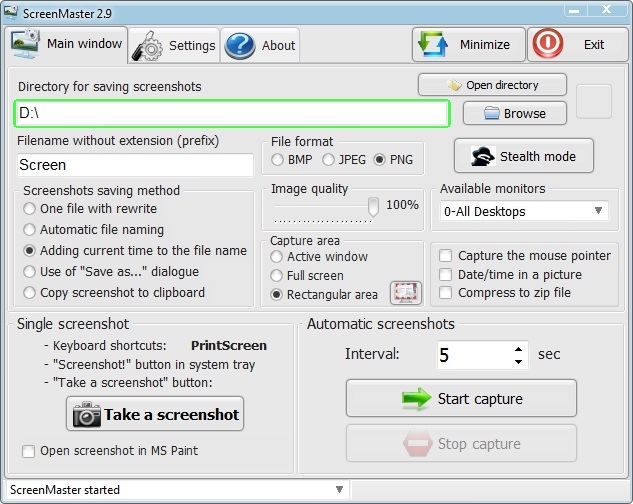
Easy program for automatic screenshot capture allowing making screenshots with set frequency. Option of fast screen capture with screenshot saving to specified folder. The program can work in hidden screen capture mode without displaying in task bar and tray. Screenshots are saved to local or network folder in JPG, BMP, PNG format or copied to clipboard. The program can be easily set up and has a user-friendly interface.
Key features of the ScreenMaster:
- Auto screenshots capture. Any interval from 1 second to 1 hour.
- Capture the full screen, an active window or a rectangular area
- Convenient menu in system tray
- Support of multiple monitors
- Automatic assigning filenames to screenshots (sequential number or date-time)
- Spy screenshot capture mode
- Automatic start of screenshot capture after program launch
- Hot keys to make screenshots
- Ability to save screenshots to shared network folders
- Option of daily creation of subfolders for screenshots in automatic screenshot capture mode
- 'Save as..' request in manual screenshot capture
- Automatic capturing is paused when the computer is idle
- Feature of captured screenshot auto opening in MS Paint
- Automatic cleaning of old screenshots
- Limited maximum size of the folder with screenshots
- Saving in BMP, JPEG, PNG formats with specified image quality
- Option to archive screenshots in a zip archive
- Selection of system settings - Personal (for each user) or Global (for all users)
- Event logging
Supported OS: MS Windows XP, Vista, 7, 8
About ScreenMaster
This Screen Capture program is available in English, German, Russian, Slovenian, Ukrainian. It was last updated on 29 September, 2026. ScreenMaster is compatible with the following operating systems: Windows, Windows-mobile.
The company that develops ScreenMaster is SEASoft. The latest version released by its developer is 2.9. This version was rated by 4 users of our site and has an average rating of 4.0.
The download we have available for ScreenMaster has a file size of 1.0 MB. Just click the green Download button above to start the downloading process. The program is listed on our website since 2016-09-18 and was downloaded 998 times. We have already checked if the download link is safe, however for your own protection we recommend that you scan the downloaded software with your antivirus. Your antivirus may detect the ScreenMaster as malware if the download link is broken.
How to install ScreenMaster on your Windows device:
- Click on the Download button on our website. This will start the download from the website of the developer.
- Once the ScreenMaster is downloaded click on it to start the setup process (assuming you are on a desktop computer).
- When the installation is finished you should be able to see and run the program.
Program Details
General
System requirements
Download information
Pricing
Version History
version 2.9
posted on 2016-09-18
* Automatic capturing of the selected screen area
* Improved menu appearance in the system tray
* Other minor changes
